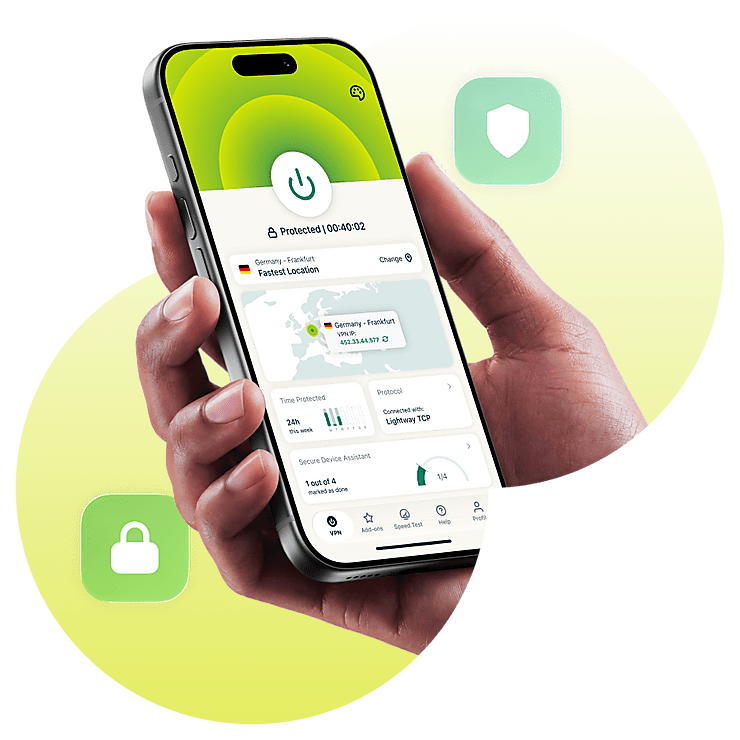
Mobile VPN for secure, private browsing
- Use the lean Lightway protocol designed for speed
- Protect your data on 5G and public Wi-Fi with strong encryption
- Hide your activity to limit ISP throttling and ad profiling
-

IPHONE/IPAD -

Android -

Windows -

Mac -

Linux -

Router -

Smart TV -

Game console
How to set up a mobile VPN
Get more protection and privacy for your phone in a few minutes
-
Step1

Create an ExpressVPN account
Sign up and download ExpressVPN on iOS or Android.
-
Step 2

Sign in and choose a server
Sign in and pick a VPN server from 214 locations worldwide.
-
Step 3

Browse with more privacy
Just tap Connect to protect your traffic on Wi-Fi and mobile data.
24/7 customer support via live chat and email
Why your phone needs a mobile VPN
Protect your data on public Wi-Fi, while limiting ISP snooping and website tracking
-

Protect your data on public Wi-Fi
Connecting to café Wi-Fi or a bad hotspot can expose your data to snoopers. ExpressVPN secures your device’s traffic with 256-bit AES encryption, preventing others from reading your data, even on the same network.
-

Hide your browsing data from your ISP
Whether on Wi-Fi or mobile data, your ISP can see your online activity. With VPN protection, your provider only sees VPN traffic, making it hard to identify your real activity or apply content-based throttling.
-

Access your accounts reliably while traveling
Apps and services may behave differently as your IP address changes when you’re on the go. Using a VPN while traveling to a server near your home region helps you have a familiar browsing and streaming experience while you’re out seeing the world.
-

Reduce tracking on apps and websites
Apps and sites use trackers to follow you across the web and profile your behavior. ExpressVPN changes your IP address and comes with a tracker blocker, reducing how much of your activity trackers can link back to you.
Why ExpressVPN is the top choice for your phone
Choose a mobile VPN that prioritizes stability, privacy, and active support

Fast connections with Lightway
Even a small connection drop stops things cold when you’re trying to stream, scroll, or game. ExpressVPN’s proprietary Lightway protocol is built to be responsive, adapting to maintain fast, stable speeds and reconnecting quickly as your phone moves between networks.

Built-in privacy and security tools
Many websites hit you with tracker-heavy ads and intrusive requests before the pages even finish loading. ExpressVPN’s apps come with an ad blocker to filter annoying ads that profile your usage, slow your browsing, or attempt to steal your personal information. It also includes blockers that help stop known trackers and malicious sites.

Works across iPhone, Android, and more
You probably use more than one device every day, and a good VPN needs to protect all of them to truly safeguard your data. ExpressVPN offers native apps for iOS, Android, and many other major platforms, plus support for up to 14 devices under one subscription.

Reliable protection on Wi-Fi and mobile data
Every time you switch between 5G and mobile data, your connection drops momentarily and you risk exposing your data. ExpressVPN keeps your protection on with the Internet Kill Switch feature. It pauses all traffic until the secure VPN tunnel is restored first.

Convenient protection for your passwords
When you reuse the same password for every account, a single exposed login can put multiple accounts at risk. ExpressKeys* lets you create, store, and autofill unlimited strong passwords.
It uses zero-knowledge encryption so only you can decrypt your data with the master vault password or biometrics.
*ExpressKeys is included with Advanced and Express Pro subscriptions or available as a standalone subscription through the ExpressKeys mobile app

Better mobile gaming on the go
Lag due to poor ISP routing can ruin your game on mobile data. Our mobile gaming VPN has an extensive 10Gbps and 40Gbps server network in 113 countries to help you find a better route. Our apps come with a built-in server speed test or just toggle Smart Location to automatically find the fastest option nearby.
ExpressVPN vs. free mobile VPNs
ExpressVPN has privacy, quality-of-life, and coverage features free VPNs can’t touch
| ExpressVPN | Most free VPNs | |
|---|---|---|
| Speed and recovery | Uses the Lightway protocol with a lean, Rust-based design for fast connections | Often slow, made worse by heavy congestion, and disconnects under strain |
| Server network | Network of 10Gbps and 40Gbps servers across 214 locations in 113 countries | Few, low-capacity server options, with location limits for free accounts |
| Privacy and data handling | Follows a detailed no-logs policy backed by repeated independent audits | Unclear privacy practices, and may rely on ads or data collection for income |
| Mobile reliability | Designed to keep up as you move between networks, with minimal battery usage | Typically inconsistent on mobile, and usually doesn’t have a kill switch |
| Device and app support | Dedicated apps for major devices, with 10 to 14 active connections per subscription | Supports a single device, with limits to what you can do without upgrading |
| Bandwidth and long sessions | Gives you fast, reliable mobile VPN performance with unlimited bandwidth | Often limits bandwidth, caps data, or restricts server access |
Trusted by mobile users around the world
See what happy users and publications have to say about our VPN for mobile
-
#1 Best VPN 2026
Best Gaming VPNExpressVPN is the best Gaming VPN right now, thanks to its impressive speeds, excellent privacy protections and expansive global network of servers.

-
Editor’s Choice Award 2026
ExpressVPN’s expansive network and dedication to staying on the forefront of encryption tech earn it an award.

-
#1 Best VPN for the U.S. 2026
ExpressVPN is the best VPN for the U.S. right now. It has VPN servers in every American state, excellent security, and a simple user interface.

-
The fastest VPN
ExpressVPN is the fastest VPN I’ve found. It shows you the fastest server you can connect to, and a list of alternative servers. Or, you can let it choose for you. It’s affordable and worth it.
Christopher Gilmer


-
Great for travel & access
Does exactly what it's supposed to. Using it while travelling is great, accessing international websites for purchases is great, doesn't lag internet speed too much. Peace of mind and super easy to use.
Sam H.


-
Extremely reliable
ExpressVPN provides extremely reliable service that will keep you and your personal information safe. ExpressVPN is the perfect all around VPN service for your network security needs.
Dirt_Reynolds
-
Protects all devices
Just want to say, I have used ExpressVPN for over 10 years. On my phone, computers, and even on my home router. You guys are the very best!
OneDarkSeed

-
Excellent value
One of the major names in virtual private network (VPN) services, ExpressVPN offers a lot to consumers at face value.
MacHash

-
Post-quantum encryption
Backed by bleeding-edge post-quantum encryption technology, Express has landed a firm spot on our best VPNs list.
Carles Dijous






FAQs about mobile VPNs
Find quick answers about mobile VPN use, safety, privacy, and device support
Can you use a VPN on mobile?
Yes. If you’re wondering how to use a VPN on mobile easily, just install ExpressVPN, sign in, and tap Connect. Its lightweight iPhone and Android apps make it quick to set up on both Wi-Fi and mobile data.
Is there a free VPN for mobile?
Yes, but a free mobile VPN often limits speed, data, or server choice. ExpressVPN uses a paid model instead, with built-in ad and tracker blocking, an audited no-logs policy, and dependable support rather than the usual free VPN trade-offs.
Do mobile VPNs actually work?
Yes. A mobile VPN encrypts your traffic and masks your visible IP when it’s on. ExpressVPN pairs secure 256-bit AES encryption with its fast Lightway protocol and no-logs features to help keep your connection more private and stable.
Should I always use a VPN on my phone?
If you use public Wi-Fi, travel often, or want less exposure on mobile data, yes. ExpressVPN makes using a VPN on mobile easier with Lightway, which reconnects quickly as your phone switches networks.
Can someone hack your phone if you have a VPN?
A VPN helps reduce some network-based risks, but it can’t stop every attack. ExpressVPN encrypts your connection, and advanced protection features help block malicious domains, limit tracking, and reduce unwanted ads.
What mobile devices does ExpressVPN support?
ExpressVPN supports iPhone, iPad, and Android, plus other major platforms, with up to 14 active connections under one subscription. If you’re comparing the best mobile VPN options, then things like dedicated apps, a lean protocol, and multi-device support all matter.
Try ExpressVPN for mobile
Get audited protection, less online exposure, and fast connections
- Secure your mobile activity on any network
- Cover up to 14 devices with a single subscription